Introducing Magda: A Free, Open Source Cassandra Client
Looking for a modern Cassandra GUI that doesn't cost a fortune? Meet Magda—a free, open source Apache Cassandra desktop client built entirely in Rust.
The Problem with Existing Cassandra Tools
If you've worked with Apache Cassandra, you know the struggle of finding a good Cassandra management tool. The options are limited:
- DataStax DevCenter — Discontinued since 2018
- DBeaver — Great tool, but Cassandra support feels like an afterthought
- cqlsh — Powerful but no GUI, steep learning curve
- Web-based admin tools — Slow, require setup, often paid
- TablePlus/DataGrip — Excellent UX, but Cassandra isn't the focus
I wanted a dedicated Cassandra query tool with the polish of TablePlus—free, fast, and built specifically for CQL workflows.
What is Magda?
Magda is a native Cassandra database client for macOS, Linux, and Windows. It's designed from the ground up for Apache Cassandra—not adapted from a generic SQL tool.
The name comes from the iconic Brazilian sitcom "Sai de Baixo" (1996-2002)—a tribute to Brazilian culture and a reminder that software should be fun.
Features
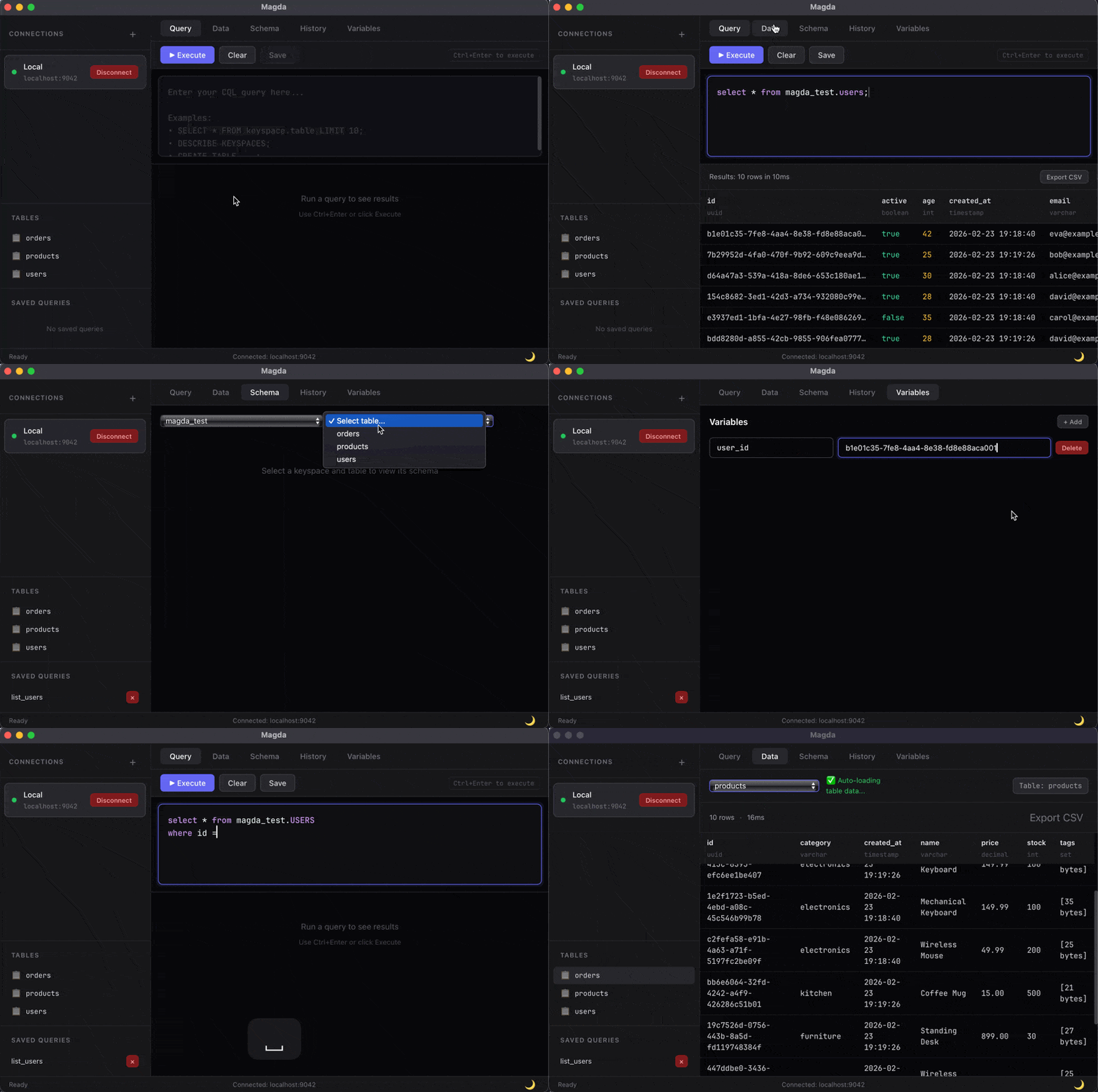
CQL Editor with Autocomplete
A proper CQL editor with syntax highlighting and schema-aware autocomplete. The editor understands your keyspace structure and suggests table names, column names, and CQL functions as you type.
SELECT user_id, email, created_at
FROM users
WHERE user_id = {{user_id}}
LIMIT 100;
Visual Schema Browser
Explore your Cassandra database schema visually. Browse keyspaces, tables, column types, partition keys, and clustering order without writing a single query.
Perfect for understanding data models in unfamiliar clusters or onboarding new team members.
Query Variables
Use {{variable}} syntax for parameterized queries. Run the same CQL query with different values without rewriting it—essential for debugging and data exploration.
Multi-Cluster Connection Manager
Manage connections to multiple Cassandra clusters simultaneously. Switch between development, staging, and production environments with a single click.
Save connection profiles with custom colors and tags to avoid costly mistakes in production.
Data Export
Export query results to CSV for analysis in Excel, pandas, or other tools. JSON export coming soon.
Why Another Cassandra Client?
Most database GUIs are built for relational databases and add NoSQL support as an afterthought. Magda is different:
- CQL-first design — Built specifically for Cassandra Query Language
- Understands Cassandra concepts — Partition keys, clustering columns, consistency levels
- Lightweight — No JVM, no Electron, just a ~15MB native binary
- Free and open source — MIT license, no premium tiers
Technical Stack
Magda is built with modern Rust technologies:
- Rust — Memory-safe systems programming with zero-cost abstractions
- Dioxus 0.7 — Reactive UI framework (think React, but for Rust)
- cdrs-tokio — Pure Rust driver for Apache Cassandra (no C dependencies)
The result is a Cassandra admin tool that starts instantly, uses minimal memory, and runs natively on all major platforms.
Why Rust for a Database Client?
I wrote about learning Rust in my Rust for Web Developers post. For desktop applications, Rust offers compelling advantages:
- Native performance — No garbage collection pauses during large result sets
- Small binaries — ~15MB vs 200MB+ for Electron-based tools
- Cross-platform — Single codebase for macOS, Linux, Windows
- Memory safety — No crashes from null pointers or buffer overflows
Download Magda
Pre-built binaries are available for:
- macOS (Apple Silicon / ARM64)
- Linux (x86_64, .deb package)
- Windows (x86_64, installer)
Download from the releases page.
Roadmap
Planned features for the Cassandra workbench:
- JSON export — Export results in JSON format
- Light theme — For those who prefer it
- Inline data editing — Edit rows directly in the table view
- Query performance analyzer — Identify slow queries and missing indexes
- Visual schema designer — Design tables with anti-pattern detection
- Cluster health dashboard — Monitor node status and performance metrics
Open Source Cassandra Client
Magda is MIT licensed and fully open source. Whether you're a developer managing a single Cassandra cluster or an ops team handling dozens of nodes, contributions are welcome.
Give it a try and let me know what you think!
GitHub: github.com/sidneip/magda
Keywords for fellow Googlers: free cassandra gui, open source cassandra client, cassandra desktop app, cql editor, cassandra database browser, datastax devcenter alternative, dbeaver cassandra alternative
Questions or feedback? Reach out on Twitter or open an issue on GitHub.